pi-power-button
Scripts used in our official Raspberry Pi power button guide.
Installation
- Connect to your Raspberry Pi via SSH
- Clone this repo:
git clone https://github.com/Howchoo/pi-power-button.git - Run the setup script:
./pi-power-button/script/install
Uninstallation
If you need to uninstall the power button script in order to use GPIO3 for another project or something:
- Run the uninstall script:
./pi-power-button/script/uninstall
Hardware
A full list of what you'll need can be found here. At a minimum, you'll need a normally-open (NO) power button, some jumper wires, and a soldering iron. If you don't have a soldering iron or don't feel like breaking it out, you can use this prebuilt button instead.
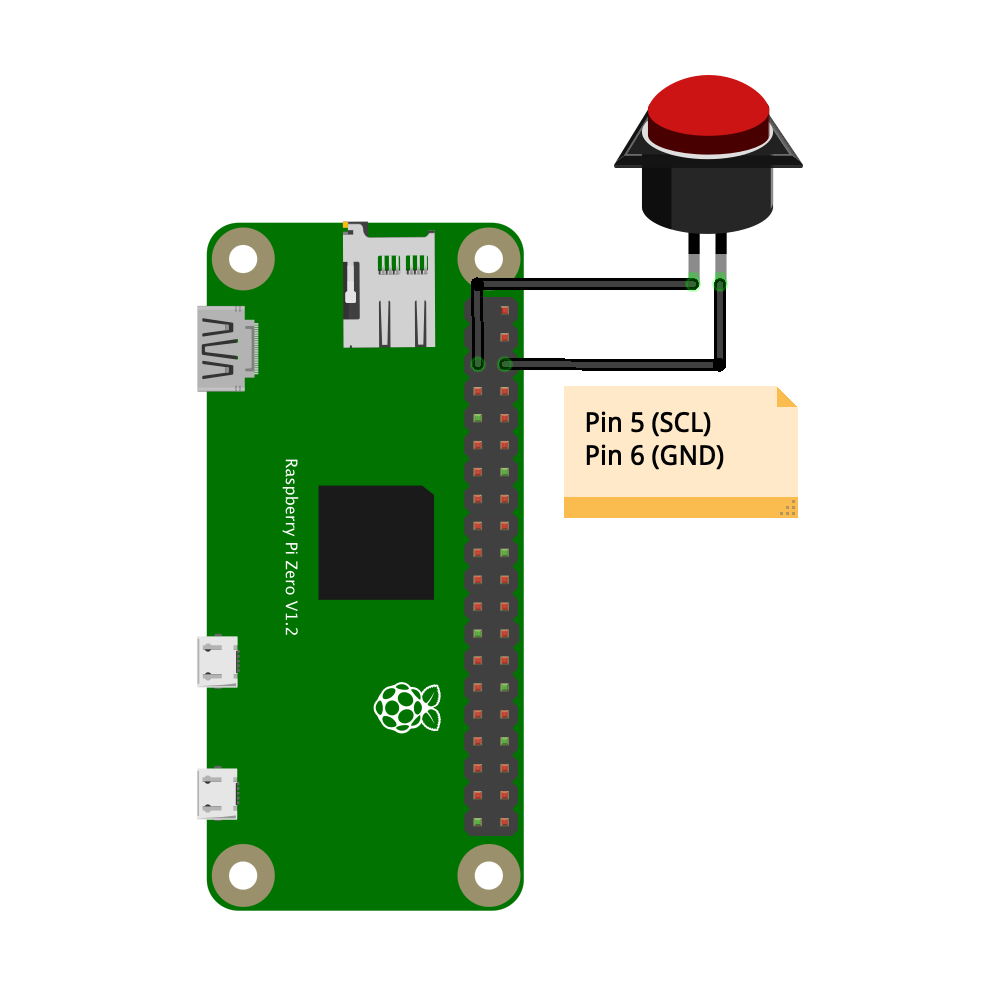
Connect the power button to Pin 5 (SCL) and Pi 6 (GND) as shown in this diagram: